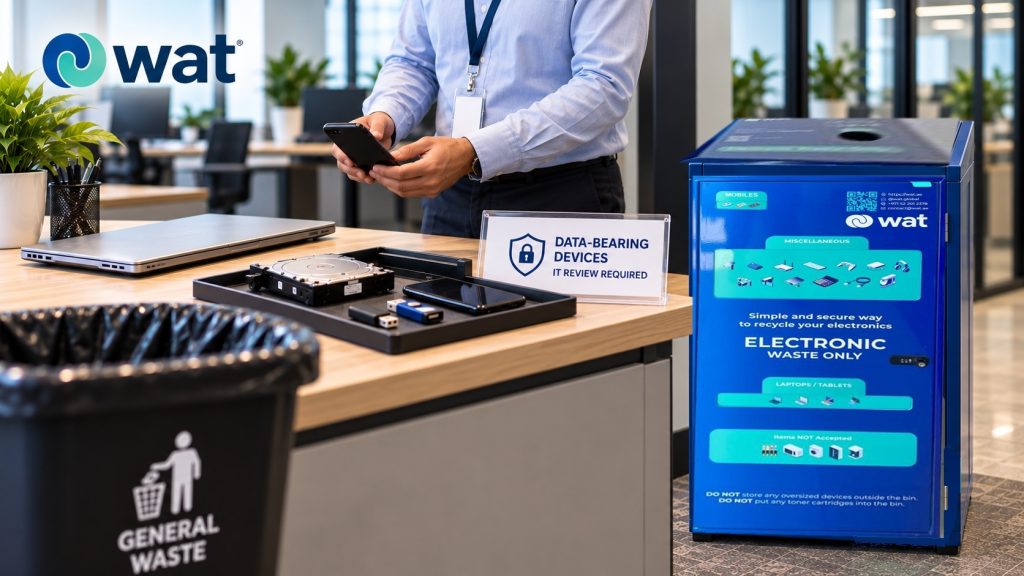
An old phone in a desk drawer may look harmless.
A USB drive left in a storage box may look too small to matter. A hard drive removed from an old computer may feel like a forgotten part of a bigger device.
But for businesses, these small data-bearing items can create a serious disposal risk if they end up in general waste bins.
Phones, USBs, hard drives, laptops, tablets, memory cards, and other storage devices are different from ordinary office waste because they can still hold information. Even if they are outdated, damaged, replaced, or no longer turning on, they may still contain files, saved accounts, contact lists, photos, emails, business records, or access credentials.
That is why these devices should not be treated like ordinary office clutter.
They need a clearer route.
For UAE companies, the issue is not only environmental. It is also about data security, employee behaviour, and how the business controls electronics before they leave the workplace.
Why general waste bins are the wrong route
A general waste bin is designed for everyday waste. It is not designed to protect information.
Once a phone, USB, hard drive, laptop, or tablet is mixed with ordinary waste, the business loses visibility over where that item goes next. It may pass through cleaners, building staff, waste handlers, transport, sorting areas, or landfill-related channels without any data review or controlled handover.
That may not matter for a food wrapper. It can matter a lot for a device that once stored business information.
The risk is not limited to large computers. Small devices can be easier to lose, easier to remove, and easier to overlook during office cleanups.
What makes old phones, USBs, and hard drives different
Data-bearing devices can retain information long after people stop using them.
This can include:
● client files
● employee documents
● saved passwords
● photos and videos
● email attachments
● financial records
● contracts and proposals
● device backups
● browser sessions
● authentication apps
● work chat files
● access details for cloud accounts
A device does not need to be active to create a risk.
A broken phone may still contain storage. A USB drive may still hold copied files. A removed hard drive may still be readable. A tablet that has not been used for years may still have synced accounts or cached information.
This is why companies should treat these items as data-bearing electronics, not general waste.
Deleting files is not the same as secure data handling
Official cybersecurity guidance supports this point. CISA’s Disposing of Devices Safely guide explains that deleting files or moving them to the trash does not necessarily remove the information from a device. Data can remain recoverable unless the device or storage media is handled properly.
NIST SP 800-88 Rev. 2 also explains that media sanitization should make access to target data infeasible for a given level of effort, with sanitization and disposal controls chosen based on the sensitivity of the information.
For companies, this is why old phones, USBs, hard drives, laptops, and tablets should not be treated like ordinary waste. Before these devices leave the office, they should move through a secure handling route that may include data removal, hard disk shredding, asset destruction, or another approved process.
Common items that should not go into general waste bins
The most obvious examples are laptops and desktop hard drives, but the list is wider than that.
Companies should be careful with:
● old mobile phones
● tablets
● laptops
● external hard drives
● internal hard drives removed from computers
● USB flash drives
● memory cards
● solid-state drives
● backup drives
● old company phones
● access devices
● small networking devices
● devices used for authentication or account access
Some of these items are small enough to disappear into a pocket, drawer, open box, or regular trash bin. That is exactly why they need a clear internal process.
A secure e-waste bin is not the same as an open box
Some offices place an open carton in the IT room or storage area and use it as a temporary electronics collection point.
That may look convenient, but it should not be treated as a secure e-waste bin.
Open boxes are easy to ignore, easy to misuse, and difficult to control. They may be suitable for sorting low-risk accessories for a short time, but they are not the right option for phones, USBs, hard drives, laptops, tablets, and other devices that may contain data.
A secure e-waste bin gives the office a clearer, safer starting point. It helps separate electronics from general waste and can support a more controlled handover process.
How WAT fits into a safer disposal route
This is where a structured e-waste management system, like WAT’s proprietary e-waste management system, can help companies move data-bearing devices into a more responsible route instead of leaving them in drawers, cabinets, open boxes, or general waste areas.
For items such as laptops, tablets, phones, USBs, and hard drives, the bin should be part of a wider process. The company still needs rules for what employees can place in the bin, which devices need review first, and when secure handling is required before final processing.
The important point is control. Devices should move from use, to collection, to handover, to secure downstream handling without becoming invisible inside regular waste.
Need a safer route for data-bearing devices?
If your office has old phones, USBs, hard drives, laptops, or tablets sitting in drawers or mixed storage, WAT’s secure e-waste bins can help create a more controlled collection point before those devices enter a responsible handling process.
Request an e-waste collection or contact WAT to discuss secure electronics disposal, data removal, hard disk shredding, asset destruction, and responsible handling for your UAE workplace.
Why small devices are often the biggest risk
Large equipment is usually easier to notice. A retired desktop or printer takes up space. A server or laptop may be logged by IT. But small data-bearing devices often move quietly through the office.
USBs are handed between teams. Old phones are placed in drawers. Memory cards stay inside cameras. External drives are kept as backups and then forgotten. Hard drives are removed during repairs or upgrades and placed into storage without a final decision.
These small items can create confusion because no one is sure who owns them, what data they contain, or whether they have been properly cleared.
That is why companies should not wait until a full office cleanup to deal with them. Data-bearing electronics need a routine process.
What companies should do before handover
Before old phones, USBs, hard drives, laptops, or tablets leave the office, companies should create a simple internal checkpoint.
This can include asking:
● Does this device contain storage?
● Was it used by an employee, team, customer, or department?
● Could it contain personal, financial, client, or operational information?
● Has data been reviewed, removed, or handled through an approved process?
● Does this item need hard disk shredding, asset destruction, or another secure route?
● Who is responsible for approving the handover?
● Where should the device be stored before pickup?
The process does not need to be complicated, but it should be clear enough that data-bearing devices are not treated like ordinary office clutter.

How to reduce employee mistakes
A strong process is only useful if employees understand it.
Companies can reduce mistakes by:
● placing secure e-waste bins in visible office areas
● labelling bins clearly
● telling employees that phones, USBs, drives, laptops, and tablets are not general waste
● creating a separate rule for data-bearing devices
● training admin, IT, facilities, and office managers on the handover process
● reviewing drawers and storage rooms during cleanups
● avoiding open boxes for sensitive electronics
The goal is not to make employees responsible for technical data decisions. The goal is to make the first step obvious: data-bearing electronics should not go into regular trash.
What not to do with data-bearing devices
Companies should avoid:
● throwing phones, USBs, hard drives, tablets, or laptops into general waste bins
● assuming a broken device has no recoverable data
● leaving hard drives in open storage
● using unlabelled cartons as long-term e-waste bins
● allowing employees to take old company devices without review
● mixing data-bearing electronics with food waste, paper waste, or ordinary trash
● delaying collection until devices are lost or forgotten
● handing over devices without a clear approval route
These are simple mistakes, but they can create unnecessary data-security and operational risk.
The practical rule for UAE offices
A practical rule is this:
If a device may contain data, do not place it in general waste.
That includes old phones, USBs, hard drives, laptops, tablets, and storage devices. Even if the item is damaged, outdated, or no longer used, it should go through a more controlled route.
Accessories such as chargers, cables, keyboards, and mice also belong in e-waste handling rather than regular trash, but data-bearing devices need extra care because of the information they may still hold.
A better office process separates electronics early, keeps data-bearing items visible, and moves them into secure downstream handling when needed.
FAQs
Can old phones go into general waste bins?
No. Old phones may still contain personal, business, or account-related information. They should be separated from general waste and handled through a responsible e-waste route.
Are USB drives a data-security risk?
Yes. USB drives are small, easy to lose, and may still contain copied files, backups, documents, or sensitive information. They should not be treated as ordinary waste.
Can a broken hard drive still contain data?
Yes. A hard drive that no longer works normally may still contain recoverable data or storage components. Companies should use an approved secure handling route before disposal or recycling.
Should laptops and tablets go into regular trash?
No. Laptops and tablets can contain storage, batteries, personal data, work files, and account access. They should be collected through a dedicated e-waste process.
How can companies reduce the risk?
Companies can reduce the risk by separating data-bearing devices from general waste, using secure e-waste bins or electronics recycling boxes, like WAT, creating clear internal rules, reviewing stored devices, and using secure downstream handling such as data removal, hard disk shredding, or asset destruction where needed.
If your business has old phones, USBs, hard drives, laptops, tablets, or other data-bearing electronics sitting in drawers, cabinets, storage rooms, or general waste areas, WAT can help create a safer collection route.
WAT’s secure e-waste bins and responsible handling process can support better separation, data-security control, hard disk shredding, asset destruction, and responsible electronics disposal for UAE workplaces.
Request an e-waste collection or contact WAT to discuss how to keep data-bearing electronics out of general waste bins and move them into a more controlled process.