When an office refresh is underway, “retired” devices often sit in a corner until someone schedules pickup. That gap can create avoidable problems: devices get mixed up, items go missing, storage areas become cluttered, and sensitive assets stay accessible longer than they should.
A simple secure storage process solves this. It creates a controlled, short-term holding step between “device removed from service” and “device handed over for collection,” so your team can stay organized and ready for pickup day.
This guide focuses on practical controls that UAE offices can apply immediately: physical security, labeling, access control, segregation, and a clean handover process.
What “secure storage” means in an IT refresh
Secure storage is the controlled storage of retired electronics for a limited time before they leave your site. It is not a long-term warehouse and it is not a junk room. A good secure storage setup is:
- Secure: assets are in a restricted area with controlled access
- Organized: every item is labeled and accounted for
- Segregated: items are grouped to prevent mix-ups and safety issues
- Pickup-ready: packaging and documentation are prepared for a clean handover
If your office has multiple departments, multiple locations, or rotating facilities teams, secure storage becomes even more important because “everyone touched it” is where mistakes happen.
1) Choose a secure storage area that is easy to control
Pick a location that is practical and defensible from a security and operational standpoint.
A strong secure storage area typically has:
- A lockable room, cage, or cabinet (not a public hallway, pantry, or open storeroom)
- Limited entry points
- Enough space to separate device categories (see Step 4)
- Low foot traffic
- Protection from heat, moisture, and direct sunlight
If you have to choose between “perfect location” and “control,” choose control. A smaller secure room is better than a larger open space.
2) Restrict access and assign ownership
Secure storage only works when responsibility is clear.
Set these basics:
- Assign an owner: one person (or one role) is responsible for the secure storage area
- Define authorized access: keep the access list short and role-based
- Use sign-in/sign-out: a simple log is enough (name, time, reason)
- Visitor rules: no unsupervised access for visitors, contractors, or non-authorized staff
If someone asks, “Who moved this device?” your process should be able to answer with a record, not guesswork.
3) Set up a labeling standard that prevents mix-ups
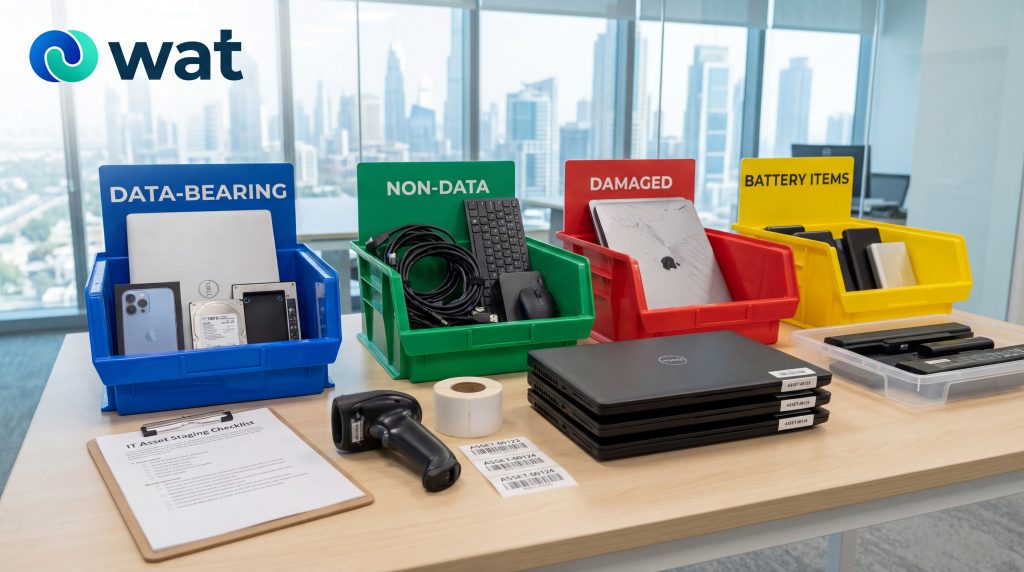
Labeling is where most secure storage processes fail. If you only label the box, items get swapped. If you only label the device, boxes get mixed. Use both.
Minimum labeling elements (device-level):
- Unique ID (can be your internal asset tag or a temporary tracking ID)
- Device type (laptop, desktop, monitor, POS terminal, etc.)
- Department or site location (so returns go to the right team if needed)
- Status tag (examples below)
Useful status tags (keep them simple):
- Pending wipe / pending erasure
- Wiped / cleared for handover
- Do not power on (for damaged items)
- Battery issue (for devices with suspected battery swelling)
- Accessories included / accessories missing (only if it matters for your workflow)
Packaging-level labeling:
- Same unique ID as the device (match them)
- Box count for a batch (Box 1 of 6, Box 2 of 6, etc.)
- Fragile label where relevant (monitors, devices with damaged screens)
If you can, use tamper-evident tape for boxes that contain data-bearing devices. It is a simple way to spot interference before pickup.
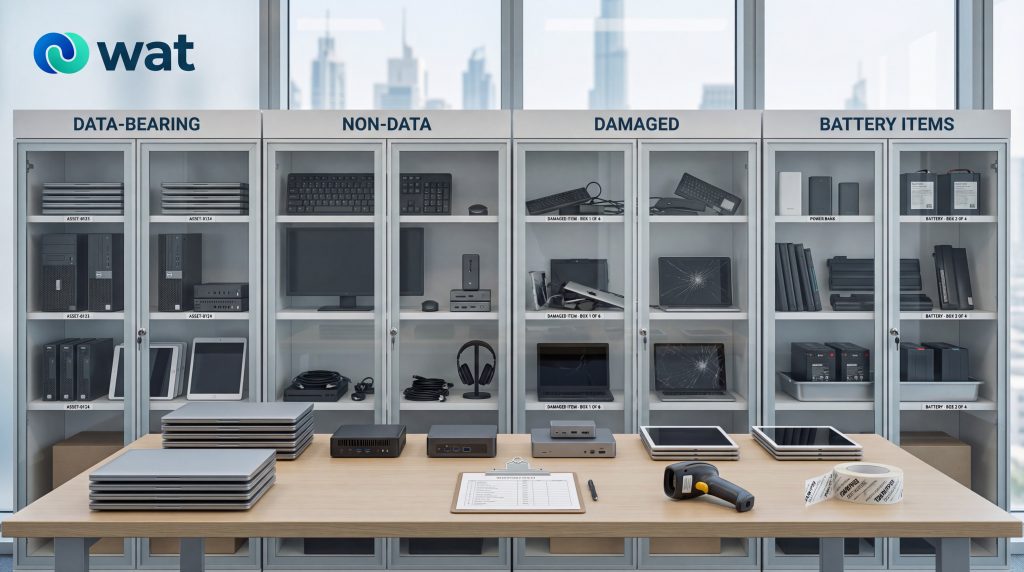
4) Segregate devices by risk and handling needs
A secure storage area should be organized by categories that reduce risk and speed up pickup.
A practical segregation model:
- Data-bearing devices (higher control)
Laptops, desktops, servers, storage devices, phones, tablets, removable media
Keep these in the most restricted part of the secure storage area. - Non-data devices (lower control)
Monitors, keyboards, mice, docks, cables, headsets (unless your office treats these as controlled assets)
These can be stored separately so you do not waste time counting low-risk items with high-risk assets. - Damaged items (special handling)
Devices with cracked screens, exposed internal components, missing covers, or signs of overheating
Mark these clearly and prevent stacking that could worsen damage. - Battery-containing devices (watch list)
Laptops, UPS units, power banks, cordless tools, handheld devices
If a device shows unusual bulging, leakage, or strong odor, do not compress it into tight boxes or stack weight on it. Isolate it and label it for special handling.
Segregation prevents the most common refresh-day problems: “we can’t find the right batch,” “this belongs to a different site,” and “we packed damaged items with regular stock.”
If your office refresh is underway and you want a clean, controlled handover process, schedule your collection early and plan the secure storage window around it. You can request a collection or book a call with WAT so pickup coordination matches your internal timeline.
5) Maintain a simple inventory and movement log
You do not need an enterprise system to run secure storage well. A spreadsheet or shared sheet is enough if it is consistently used.
Minimum inventory fields:
- Unique ID / asset tag
- Device type and brand/model (basic)
- Serial number (where available and relevant)
- Department/site
- Condition (working, non-working, damaged)
- Storage date
- Status (pending wipe, wiped, pending pickup)
Movement log fields (keep it short):
- Date/time
- Action (moved in, moved out, boxed, reboxed, transferred)
- Person responsible
- Notes (only if something is unusual)
This protects your team when questions come up later, especially when multiple internal groups are involved.
6) Prepare the pickup batch like a handover, not like disposal
The secure storage setup should be pickup-ready before the collection team arrives. That reduces onsite confusion and helps ensure that the right assets leave with the right documentation.
Before pickup day:
- Reconcile inventory: confirm counts match what is physically stored
- Finalize segregation: separate damaged and battery-issue items clearly
- Box and label: match device IDs to box IDs
- Create a pickup batch list: one sheet with totals by category
- Designate a handover point: where the collection team will load items
On pickup day:
- Have the secure storage owner present
- Use the batch list during loading
- Record the handover time and the receiving party (name/company)
- Confirm any special notes (damaged items, battery issues, fragile displays)
7) Close the refresh with documentation and reporting
A refresh feels finished when new equipment is deployed. Operationally, it is finished only when old assets are closed out with clear documentation.
After pickup:
- Mark assets as handed over (date and batch reference)
- Archive the batch list and movement log
- Store any reporting received for internal ESG or sustainability tracking
If you track impact reporting, keep the same reporting format each refresh cycle so it becomes a repeatable program instead of a one-time cleanup.
FAQs
- What is the safest way to store retired laptops and desktops before pickup in a UAE office?
Use a lockable room or controlled storage area with restricted access, clear labeling, and a basic inventory log. Keep data-bearing devices separated from general peripherals. - Should we wipe devices before placing them in the secure storage area?
If your internal process wipes devices before handover, label the device status clearly (pending wipe vs wiped). Do not rely on memory or assumptions; secure storage works best when status is visible on the device label and reflected in the inventory log. - How long should retired devices stay in secure storage before collection?
Keep the secure storage window as short as practical. The longer devices sit, the higher the chance of mix-ups, loss, and uncontrolled access. Plan secure storage around a defined pickup date. - How should we label devices so nothing gets mixed up during an IT refresh?
Use a unique ID on the device and the box, including department/site, and add a simple status tag (pending wipe, wiped, do not power on). Make sure the inventory sheet uses the same IDs. - What should we do with devices that look damaged or have possible battery swelling?
Segregate them from regular devices, label them clearly, avoid stacking weight on them, and keep them in a stable storage position until handover. If you are unsure about handling, isolate the item and treat it as special-handling for pickup planning.
If you are planning a refresh, relocation, or a scheduled device retirement cycle, organize your secure storage window first and align it with collection planning. For pickup coordination, questions about secure storage categories, or timing, contact WAT and request a collection.